Ever wondered how to keep your startup dreams on track without drowning in chaos or breaking the bank? Launching a business, like a craft shop or consulting gig, comes with endless tasks and tight budgets that can overwhelm even the most determined entrepreneur. That’s where Trello steps in—a free, user-friendly tool that helps you organize your startup journey affordably. In this post, we’ll explore how Trello supports the seven-step framework in Start on a Shoestring: Your Business Launch Guide, especially for Business Setup and Finances. Whether you’re mapping out your business plan or tracking every penny, Trello’s got you covered. Pair it with free resources at StartOnAShoestring.com/resources to launch your business with confidence. Let’s dive into how this tool empowers you to stay organized and frugal!
Why Trello is a Game-Changer for Startups
Trello is a visual project management tool that organizes tasks into boards, lists, and cards, making it perfect for budget-conscious entrepreneurs. Its free plan offers unlimited cards, lists, and up to 10 boards per workspace—plenty for a small business like a craft shop or freelance consultancy. Acquired by Atlassian in 2017, Trello is used by over two million teams, including 80% of Fortune 500 companies, proving its reliability. For beginners, its drag-and-drop interface is intuitive, requiring no tech expertise. You can set up a board in minutes and start organizing tasks, from registering your business to tracking expenses. Best of all, it’s free, aligning perfectly with our mantra: Start frugal, grow big! Trello’s scalability means it grows with your business, whether you’re a solo hustler or building a small team.
How Trello Supports Business Setup
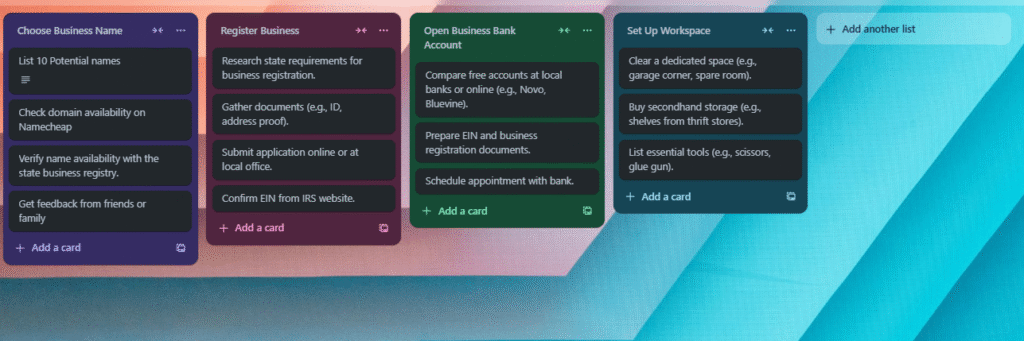
In Start on a Shoestring, the Business Setup step is all about laying a solid foundation—think registering your business, defining processes, and organizing tasks. Trello shines here by turning chaos into clarity. Create a board called “Business Setup” with lists like “To Do,” “In Progress,” and “Done.” Add cards for tasks like “File LLC paperwork” or “Open a business bank account.” Each card can include checklists, due dates, and attachments, keeping everything in one place. For example, a craft shop owner might use a card to track supplier research, attaching price lists for easy reference. Trello’s free plan syncs across devices, so you can update tasks from your phone or laptop. Pair this with our free Business Setup Worksheet at StartOnAShoestring.com/resources to map out your setup tasks efficiently. Free tools, big dreams!
Trello for Budget Tracking in Finances
Managing finances on a tight budget is a top concern for startups, and Trello’s versatility makes it a surprising ally for the Finances step. Set up a “Finances” board with lists like “Income,” “Expenses,” and “Pending Payments.” Use cards to track monthly bills, supplier costs, or freelance income. For instance, a consultant could create a card for each client invoice, adding due dates and payment status labels (e.g., “Paid” or “Overdue”). Trello’s free Calendar Power-Up lets you visualize payment deadlines, helping you avoid late fees. You can even attach receipts or budget spreadsheets to cards. This hands-on approach, as outlined in our Finances and Operations Worksheet at StartOnAShoestring.com/resources, keeps your cash flow organized without pricey software. Start lean, grow smart!
Practical Tips to Get Started with Trello
Ready to make Trello your startup sidekick? Here are three practical ways to use it:
- Streamline Business Setup: Create a board for each major task category (e.g., “Legal,” “Operations”). Use checklists within cards to break tasks into smaller steps, like “Research EIN requirements” or “Draft vendor contracts.” This keeps you focused and moving forward.
- Track Expenses Frugally: Set up a “Budget” board with a card for each expense category (e.g., “Supplies,” “Marketing”). Add a checklist to log transactions and use labels to flag high-priority payments. This visual system helps you spot overspending fast.
- Collaborate on a Budget: Invite team members (up to 10 on the free plan) to a Trello board for free collaboration. For example, a craft shop duo can assign tasks like “Design product labels” or “Update inventory” to stay aligned without costly tools.
To start using Trello, sign up for free at Trello.com. Check out our Business Setup Worksheet at StartOnAShoestring.com/resources for a template to organize your Trello boards like a pro.
Get Started Today
Trello is your budget-friendly secret weapon for launching a business without the financial strain. Its free plan, intuitive design, and flexibility make it ideal for organizing your Business Setup and Finances steps, helping you turn big dreams into reality. As we say at Start on a Shoestring, Launch Your Business on a Shoestring! Ready to take action? Sign up for Trello today and explore our free resources at StartOnAShoestring.com/resources, like the Business Setup Worksheet or Finances and Operations Worksheet, to kickstart your journey. Join our newsletter for more frugal tips and start building your business with confidence. You’ve got this!